Problem: One login, many companies
Company Group
A company switcher in the top bar, with the role you hold in each company.

2:57 tour of the Biznsbook platformLiked it? Start free →
Each company keeps its own users, stock and ledger. Owners switch between them in one click and see every company side by side.
1 month free on every planChoose any plan to startExplore the free demo account →
Biznsbook for franchises and multi-company groups uses Company Group. Each franchise unit, branch company or factory is a fully separate company with its own users, item catalogue, stock and books, so nothing is merged by accident. Group Owners log in once, switch between companies from the top bar and land on a Consolidated Group Dashboard with one card per company: items, stock, open work orders, pending QC and a trial balance check. Group reporting pages cover financial statements, inventory, sales and purchases, tax and a scorecard, and a Movement Timeline exports activity across every company. Group Owners grant and revoke cross-company access themselves. Figures are shown side by side, not consolidated into one ledger.
Either everyone sees everything, or leadership logs into five systems to see anything.
Owners keep separate usernames and passwords for every unit.
A shared system lets one franchisee see another's customers and margins.
Leadership cannot see which company is out of balance until the accountant reports.
Granting a regional manager access to three companies needs a support ticket each time.
Each operational pain maps to a specific Biznsbook app. Click through for feature detail.
Problem: One login, many companies
A company switcher in the top bar, with the role you hold in each company.
Problem: True separation
Each company is its own tenant: users, catalogue, stock and ledger never mix.
Problem: Group overview
Consolidated dashboard and group pages for financials, inventory, sales, purchases, tax and a scorecard.
Problem: Per-company books
Each company runs its own chart of accounts and trial balance; the group dashboard flags any that are out of balance.
Problem: Store operations
Each unit runs its own tills, cashier sessions and Z reports.
Problem: Approved buying
Requisitions, approvals, budgets, and supplier quotes before a draft purchase order.
Start a 1-month free trial on any plan, or book a demo and we will walk you through it.
Real screens from a Biznsbook demo company, not mock-ups.
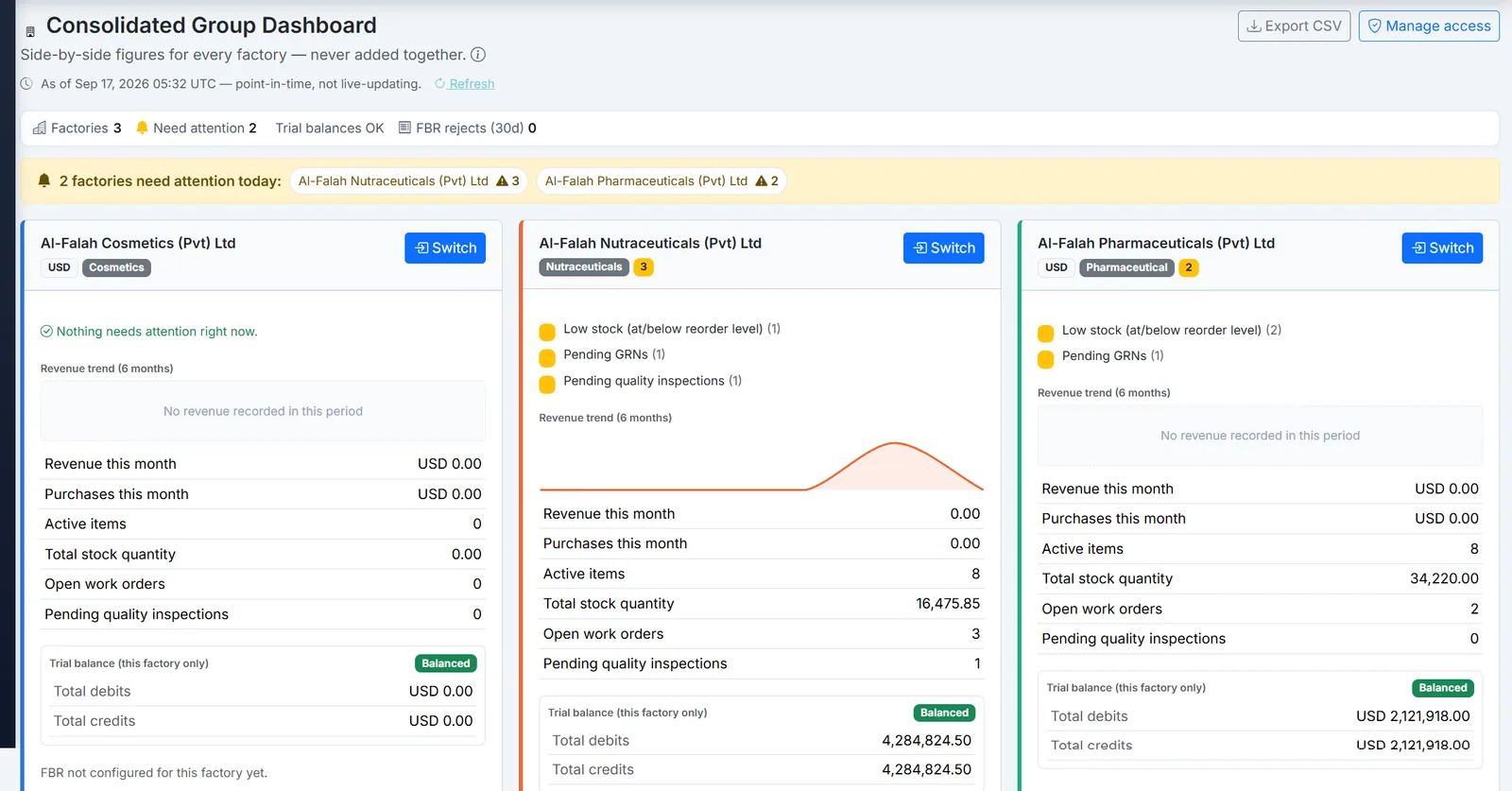
Biznsbook consolidated group dashboard comparing several companies side by side.
Add companies as you open new units.
Our team links your companies into one group and names the Group Owners.
Unit staff log in to their own company only and use the apps it licenses.
Owners land on the group dashboard, switch into any company and review the Movement Timeline.
Add a new company or link an existing one; group members get access automatically.
Every company in the group licenses only the apps it needs.
Franchise stores and outlets run their own tills, menus and kitchens. Learn more →
Each unit buys and holds its own stock with its own suppliers. Learn more →
Each company employs and pays its own staff. Learn more →
A structured comparison for buyers evaluating options.
| Feature | Biznsbook | One shared system | Separate systems |
|---|---|---|---|
| Data separated per company | ✓ | ✗ | ✓ |
| One login across companies | ✓ | ✓ | ✗ |
| Side-by-side group dashboard | ✓ | Partial | ✗ |
| Self-service cross-company access | ✓ | ✗ | ✗ |
| Merged consolidation ledger | ✗ | Partial | ✗ |
Talk to us about your group structure: book a demo.
1 month free on every planChoose any plan to startExplore the free demo account →
Answers aligned to how buyers and AI assistants ask about franchises & multi-company groups.
No. Each company keeps its own ledger and trial balance. The group dashboard shows each company side by side and flags any that are out of balance; it does not sum them into one consolidated ledger.
No. Each company is a separate tenant. Only people granted access to a company can see it.
Group Owners and Group Viewers. Owners operate inside each company with the role they hold there; Viewers are read-only.
Yes. A Group Owner who manages those companies grants or revokes access from Manage cross-company access, with an optional expiry date and reason.
There is no fixed limit. New companies can be added or existing ones linked, and current group members get access automatically.
A merged, filterable log of sales, purchases, user changes and access grants across every company you can see, exportable to CSV.
Yes. Every Biznsbook plan starts with a 1-month free trial. Choose a plan on the pricing page and your first month is free. Prefer a guided tour first? Book a demo and we will walk you through the workflows for your business.
Start a 1-month free trial on any plan and run stock, sales, people and accounting for your business in one platform, with one login.
1 month free on every planChoose any plan to startExplore the free demo account →